
A number above a note, a circle around a measure, an arrow to mark a leap… As you work on a piece, the piano score often ends up covered with all sorts of annotations, sometimes to the point where it’s hard to follow.
The idea, however, isn’t to write everything down, but to keep the notes that will be useful to you at the next rehearsal. Too few cues, and you’ll forget your choices from one session to the next. Too many notes, and the music gets lost under all the colors and symbols. Here are the annotations you should prioritize to improve your piano playing without overloading your score.
Why annotate a piano score?
Making it easier to read the score: an annotation can indicate fingering, an accidentals, a change in position, or a passage that requires extra attention.
Keep track of your choices: write down fingerings, hand movements, or interpretive ideas. Even if you set the piece aside for several weeks, you’ll be able to easily pick up where you left off.
Identify difficult passages: Add a mark to indicate which bars should be played more slowly, with hands separated or using a metronome.
Refining your interpretation: a nuance, a breath, or a voice to bring out can also be noted to better capture the musical intent.
Take note of the teacher's advice: annotations are also a way to keep track of the instructions given during class. No more risk of forgetting—everything is written down in black and white.
What information is already included in a piano score?
A piano score already contains many reference points: the two staves, the treble and bass clefs, the notes, the " rythm ," and even the rests. This is the entire vocabulary of music theory that allows us to understand what to play, at what pitch, and for how long.
Other instructions provide further details on how to interpret the music:
Dynamics indicate the intensity of the music and its variations, with terms such as piano, forte, crescendo, or diminuendo.
Articulation marks indicate how to play the notes: slurred, detached, accented, or held.
The tempo indicates the movement of the piece and gives an initial idea of its speed and character, using terms such as Andante, Allegro, or Adagio.
phrased 's slurs and symbols help you sense where a musical phrase begins and ends.
The pedal instructions specify when to press, shift, or release the pedal.
Repetitions, codas, and cross-references make it easy to follow the structure without getting lost in the pages.
The printed fingering suggestions sometimes indicate how to position your fingers, especially in more technical passages.
All these symbols are already there to help you read the music. Your personal annotations then complement the sheet music to improve your playing and make it flow more smoothly 👉 How to Read Piano Sheet Music: A Beginner's Guide.
What annotations should be added to a piano score?
Technical notes, fingering, dynamics, pedal, or tempo: annotations are primarily meant to help you remember what you've understood and practiced.
Fingering to Remember
There’s no need to write a number above each note. Focus on noting the fingerings that help you avoid hesitation: a thumb passage, a position change, a fast passage, or a sequence that doesn’t come naturally to your fingers.
Also, keep track of the fingerings you’ve tried and found to work. This will prevent you from changing them every time you practice, especially when playing scales, arpeggios, or fast passages. Consistent fingering helps your hand memorize the movement.
5 Tips for Improving Your Finger Agility on the Piano.
Keyboard Navigation
Some piano passages require you to leave a comfortable position to reach a high- chord , a distant bass note, or a new area of the keyboard. An arrow or circle on the score will help you prepare for the shift before you reach the note.
You can also specify the exact point where your eyes should leave the sheet music to focus on the keyboard, and then return to the next measure.
Chords and Arpeggio Patterns
When playing a dense ar chord , note the inversion, the distribution of notes among the fingers, or the anchoring finger that stabilizes the position. For a fast arpeggio, indicate the thumb’s movement, the starting fingering, and, if necessary, the moment when the hand changes its axis.
Also, circle notes from the same chord ion when the notation is very dense. This will help you read the harmonic structure more quickly and prepare your fingering even before you place your fingers on the keyboard.
Passages That Are Difficult to Isolate
Is there a measure that stands out, even after playing the piece several times? Circle it or highlight it so you can spot it at a glance next time.
Add a specific cue—such as “hands apart,” “pointed rythm ,” “slowly,” or “metronome at 60”—to remind yourself how to play the passage again.
🎵 Tip: Also mark one or two bars before and after the sequence to work on the flow, not just the difficulty itself.
Pedal Changes
The printed instructions do not always take into account the piano’s resonance, the room’s acoustics, or the desired “ phrased .” Note the places where you should repeat the pedal, ease off it, or lift it completely.
Pay special attention to changes in harmony and the bass line. Holding a pedal down too long can blur the chords; lifting it too abruptly can disrupt the flow. Test your timing on the instrument and adjust it by ear. 👉 Acoustic piano, digital piano, or keyboard: which model is right for you?
Nuances and Articulation
A crescendo that starts too late, an accent placed on the wrong note, or a staccato that’s too abrupt can throw off the entire balance of a phrase. Look for the nuances that go unnoticed when sight-reading, especially when they occur between the two staves or in the middle of a busy passage.
Add your own reminders where the musical intent doesn't yet come naturally: "left hand softer," "bring out the melody," or "play more legato." These instructions should guide the sound, not just the technique.
Pauses and the Ends of Sentences
Do you tend to string together bars s without letting the tension subside? Mark the ends of phrases, the points where momentum picks up again, and the places where your wrist can relax. You can add a comma, a dash, or a short arrow to indicate the direction of the musical flow.
🎵Tip: Be careful not to cut off the sound with every breath. On the piano, a phrase can continue through resonance, the sustain pedal, or another voice. This cue is used to lighten the touch or change the musical intention, without necessarily creating a silence.
Tempo Markings
Note the tempo you’ve actually mastered, and the one you’d like to achieve. For example: “quarter note = 60, steady,” then “goal: 72.” This will help you track your progress through the passage without speeding up before your rythm, fingering, and hand movements are consistent.
For a difficult passage, mark several tempo changes on the score: 60, 66, 72, then the final tempo. In a passage with rubato, a slowdown, or a return to tempo, specify the starting point and the moment when the beat should return to its steady rhythm.
Top Picks to Listen To
On the piano, the fingers can play all the right notes without the balance being quite right yet. Which voice should guide the ear? The soprano melody, a bass line that sets the harmonic direction, a counter melody played with the thumb, or an inner voice hidden within the chords?
Note the element you want to highlight as close to the passage as possible: “lead vocal,” “bass,” “subtle thumb,” “tenor,” or “background accompaniment.” In polyphonic music, you can also circle the voice you’re following or lightly trace its line to better hear its progression from one measure to the next. 👉 10 websites to find piano sheet music online
How can you add annotations without cluttering up your piano score?
Write down only what actually helps you play: before adding a note, ask yourself if it will still be useful during the next rehearsal. A fingering that’s tricky, a jump you need to anticipate, or a nuance you haven’t quite mastered yet are worth noting. On the other hand, there’s no need to clutter the page with things you’ve already mastered.
Use short, consistent symbols: an arrow for a movement, a circle for a repeat, a cross for a recurring error… Use the same symbols across different scores so you can recognize them at a glance.
Limit the number of colors: two or three colors are enough to annotate a score. For example, you can reserve one color for fingering, another for musical instructions, and a third for passages that need work.
Leave space around the notes: avoid writing over existing accidentals, dynamics, slurs, or pedal markings. A helpful annotation should not make the score harder to read.
Delete any notes that are no longer needed: when you’ve mastered a passage or a fingering has changed, remove the old mark. The score should evolve as you work on it.
Distinguish technical annotations from musical instructions: fingering, leaps, and position changes serve a different purpose than dynamics, breaths, or the " phrased." Separating them by color or symbol type makes the page easier to read.
Avoid overly long sentences: opt for a few words like “play the bass,” “prepare for the leap,” or “restart at 60” instead of a detailed instruction. 👉 Essential accessories for playing the piano.
How do I annotate a " digital sheet music " with Newzik?
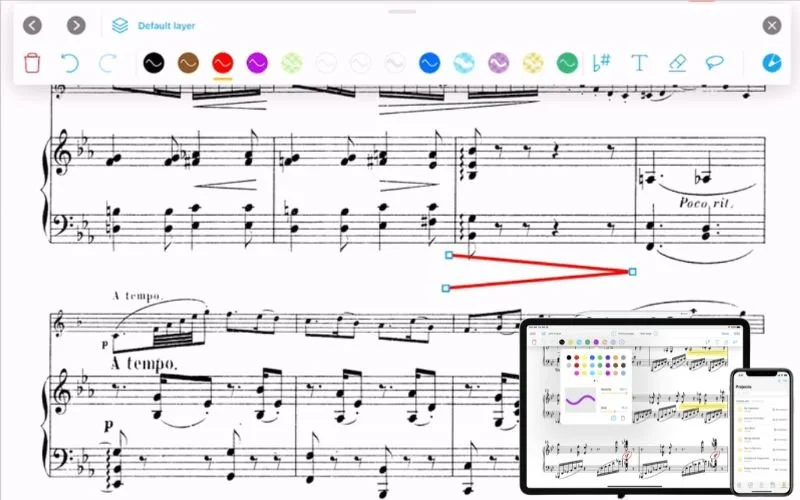
In Newzik, the annotation bar lets you add fingerings, comments, symbols, or visual cues directly to the sheet music. You can draw freehand, insert text, circle a passage, or use shapes to highlight a technical difficulty.
Customize your pens with different colors, line weights, and opacities to create your own color-coding system: one color for fingerings, another for nuances, and a third for passages that need work. The selection tool then lets you move, copy, or delete an annotation without affecting the rest of the page. Handy!
Good to know: In a Newzik project, changes made to a digital sheet music can also be shared with other musicians.
Newzik, the app designed for your piano sheet music
With Newzik, your piano sheet music goes wherever you go—on your tablet, smartphone, or computer. Import your sheet music, organize it by song or setlist, and have your entire music library in one place, whether you’re playing at home, in music class, in an orchestra, or on stage.
The app also includes several useful tools for pianists: a built-in metronome, a page turner, a transposition feature, and a scanning tool to convert your paper sheet music into digital files. You can also add audio or video files.
Want to learn more? Check out our 10 top features.
Go from pencil to digital sheet music with Newzik and try the app for free to practice your piano pieces.
I'm trying out the Newzik app (7-day free trial)
FAQ – Your Questions About Annotations in a Piano Score
Should fingering be written above or below the notes?
Right-hand fingerings are typically written above the staff, and left-hand fingerings below it. Of course, you are free to place them elsewhere if that makes the score easier to read and prevents them from obscuring a note or other indication.
Can you change the fingering already printed on a sheet of music?
Yes. The fingering suggestions provided by the publisher can be adapted to your hand and your playing style. On a printed score, cross them out and write your own fingering next to them. On a digital score digital sheet music, add your own notation on top using your app’s annotation tool.
How do you notate fingering on a piano score?
Fingering is indicated next to the notes in question using the numbers 1 through 5, from the thumb to the little finger.
How do you write your own sheet music?
You can write a score by hand on sheet music paper or use music- music notation software. First, choose the clef, time signature, and tonality, then place the notes, rhythms, and rests before adding dynamics or articulations.
When should you annotate your piano score?
From the very first reading, identify any bars s that catch your attention, hesitant fingering, or finger movements that require you to look at the keyboard. Then add to your notes as you continue working.
