
Newzik: a tool for working with, teaching, and sharing music
digital sheet music gradually digital sheet music a staple in musicians’ daily lives. Whether on stage, in rehearsals, in lessons, or at home, tablets are increasingly replacing binders and stacks of paper.
But digital sheet music than just a PDF displayed on a screen. To keep pace with this evolution, musicians now rely on tools designed to make their practice easier. The Newzik app allows users to read, organize, annotate, and share their sheet music, whether they’re practicing alone at home or as part of an ensemble.
Amateur musicians, conservatory students, teachers, orchestras, or professional artists: everyone uses the app according to their needs.
Whether it's organizing sheet music, adding annotations, coordinating group rehearsals, or practicing on your own: discover how Newzik can support you in your musical practice.
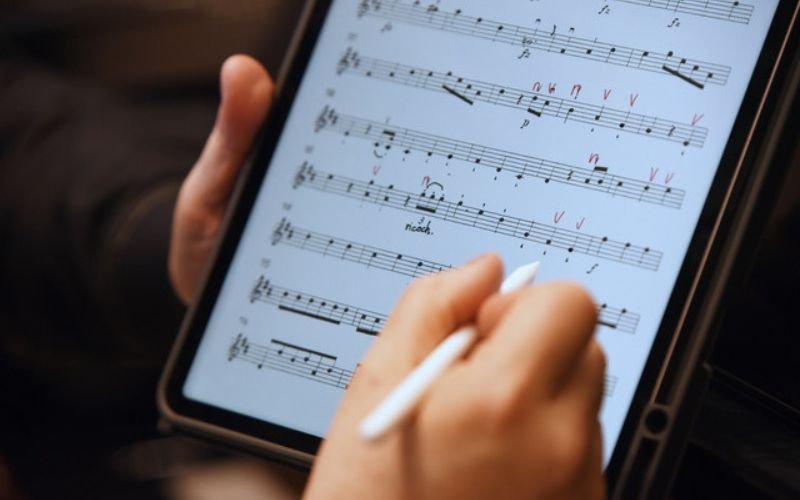
Practicing and learning a musical score
Learning a piece often requires going back to the score several times: to add fingering, mark a difficult passage, note a tip given in class, or identify a change in dynamics.
digital sheet music also digital sheet music things much digital sheet music . On Newzik, all you have to do is open your sheet music on your tablet to add markers, note a correction, or save a specific instruction from a lesson or rehearsal.
Need to convert a sheet music file? Newzik shows you how! 3 ways to convert a PDF sheet music file to a MusicXML file.
Organizing Your Music Library with Digital Sheet Music
Over the years, sheet music piles up. A piece you worked on last year, a piece you played in concert, a piece you’d like to revisit… it’s not always easy to find the right sheet music quickly.
With Newzik, sheet music is stored in a single library and organized according to your needs: by composer, by project, by concert program, or by time period.
6 Tips for Organizing Your Digital Sheet Music Library Like a Pro!
Teaching and sharing music
In music education, sheet music is a teaching tool. Where should a student take a breath? Which passage should the student practice at home? With digital sheet music, the teacher can annotate the score directly: add a technical note, highlight an important passage, or jot down advice given during the lesson.
What happens after the lesson? The student can find all these notes right there in their sheet music. No more searching through a notebook or trying to remember a comment made during class: everything is clearly marked on the piece.
Our tips for managing different skill levels in a music class.
The Newzik app is also a collaborative platform designed specifically for music teachers and schools. Want to learn more? Check out NewzikEducation.
Working on music as a group
When you're playing in a group, everything moves very quickly. A conductor asks to repeat a section, there's a change in the program, or a new instruction is given during rehearsal—and everyone has to keep up.
With the Newzik app, sheet music can be easily shared among musicians in the same ensemble. Send a document, add a note, and everyone sees the update appear on their tablet in real time.
This is particularly useful when aconductor, ensemble leader, or teacher wants to quickly share a score or instruction with the entire group.
Are you looking for a collaborative platform for your digital sheet music? Discover Newzik Ensemble, the app designed for ensembles, orchestras, and opera companies.
Follow the game in real time with LiveScores
Most of the time, sheet music is just a simple PDF file. It’s convenient for reading, but less useful when it comes to practicing the music, changing the tonality preparing different parts for an ensemble.
With LiveScores, Newzik converts these files into interactive sheet music that can be used directly within the app. Music recognition technology analyzes the notation and reconstructs the structure of the sheet music so that it can be edited.
Once the score has been converted, you can:
Follow along as you read and easily navigate by section to find your way around the work.
Transpose the tonality key signature to adapt the score to an instrument or a range.
Export the file as MusicXML or MIDI to continue working in music notation software.
Quickly prepare versions tailored to different parts or registers, such as for an ensemble or an orchestra.
In other words, LiveScores transforms a simple PDF score into a customizable music work tool that’s directly integrated into your Newzik library.
Curious to see how AI-powered sheet music conversion works? Check out the LiveScores technology in the Newzik app!
Prepare for rehearsals andconcerts
Before a rehearsal, audition, or concert, musicians often have to juggle several pieces from the program.
With the Newzik app, musicians can keep the entire program right on their tablet and easily navigate between scores. They can follow the concert’s order, go back to a specific passage, or quickly display the next piece when the conductor or ensemble decides to switch sections.
The advantage for bands or orchestras: musicians can adapt their playing in real time and stay focused on the music rather than on finding the right sheet music.
Newzik app: Discover musicians' 10 favorite features.
Newzik app: one app, a thousand uses
The Newzik app isn't just for one type of musician.
Are you just starting to learn an instrument, studying at a conservatory, teaching music, or playing in an ensemble? The app adapts to everyone’s needs and to the different ways people make music.
In everyday life, the Newzik app makes it easy to:
the organization of its repertoire
creating playlists for work or concerts
quick access to sheet music
real-time annotation of sheet music to add your own markings
sharing sheet music with other musicians
the ability to centralize all your scores in a single library, and much more!
Whether you're an amateur musician, a student, a teacher, part of an orchestra, or a seasoned artist, there's a tool here for everyone to help you organize, work on, and share your sheet music more easily.
Switch to digital sheet music Newzik.
Organize your sheet music, annotate your songs, and share them with your musicians from anywhere.
FAQ - All your questions about the Newzik app
Who is the Newzik app for?
Newzik is designed for all musicians who work with sheet music. The app is used by amateur musicians as well as conservatory students, music teachers, ensembles, orchestras, and professional musicians.
On which devices can the Newzik app be used?
Newzik is primarily designed for use on tablets, particularly iPads, so that sheet music can be comfortably displayed on a music stand. The app can also be used on iPhones and Macs, allowing you to access your sheet music library across different devices.
Can you import your own sheet music into Newzik?
Yes. Users can import their sheet music in PDF format directly into the app. Once imported, the sheet music can be organized in the library, annotated, or added to practice or concert playlists.
Can we share sheet music with other musicians?
Yes. Newzik lets you share sheet music and music documents with other users in real time.
Can you turn pages automatically in Newzik?
Yes. Newzik offers several options for turning pages while you play. Musicians can use audio matching, a feature that detects the music currently playing and automatically scrolls the sheet music, or use a Bluetooth pedal to turn pages without putting down their instrument.
Can you sync your sheet music across multiple devices?
Yes. Sheet music and annotations can be synced across multiple devices via your Newzik account. The advantage is that musicians can access their sheet music library on their tablet, phone, or computer.
Can the Newzik app be used offline?
Yes. Once the sheet music has been downloaded into the app, it remains available offline. This allows musicians to use Newzik during rehearsals, concerts, or while traveling without needing an internet connection.
Can I use Newzik to work on a song using an audio recording?
Yes. Newzik lets you link audio files to a sheet music score. This allows musicians to listen to a recording while following along with the score.
